A simple fix for a problem every laptop owner knows too well
Laptops heat up.
Some do it slowly. Others act like they’re training for liftoff.
If you’ve ever felt your keyboard get warm during a long work session or heard your fans scream during a game, you already know the frustration. Heat kills performance. It shortens component life. And it makes even light tasks uncomfortable.
That’s where a laptop cooling pad like the Havit HV-F2056 steps in. It doesn’t promise miracles. It promises airflow, stability, and a calmer laptop experience.
What Is the Havit HV-F2056?
The Havit HV-F2056 is a USB-powered laptop cooling pad built for laptops between 15.6 and 17 inches. It uses three large fans to push air upward through a metal mesh surface. No apps. No setup. Just plug it in and let it do its thing.
This cooling pad targets everyday users. Students. Remote workers. Casual gamers. Anyone who keeps a laptop running longer than it probably wants to.
It’s not trying to be flashy. It’s trying to be helpful.
First Impressions: Design and Build
Take it out of the box and the first thing you notice is how light it feels. That’s a good thing. No one wants to lug around extra weight in a backpack.
The surface is a metal mesh, which matters more than it sounds. Metal spreads heat better than plastic. It also feels sturdier under pressure.
The frame around it is plastic. Solid plastic. No sharp edges. No creaking when you pick it up.
The look is simple. Blue LED lights glow under the fans once it’s powered on. You’ll either like them or ignore them after five minutes. There’s no switch to turn them off, which is worth noting if you prefer a dark setup at night.
Overall, it looks clean. Functional. Like something meant to be used daily, not admired on a shelf.
Size, Fit, and Everyday Comfort
This cooling pad is wide. That’s intentional.
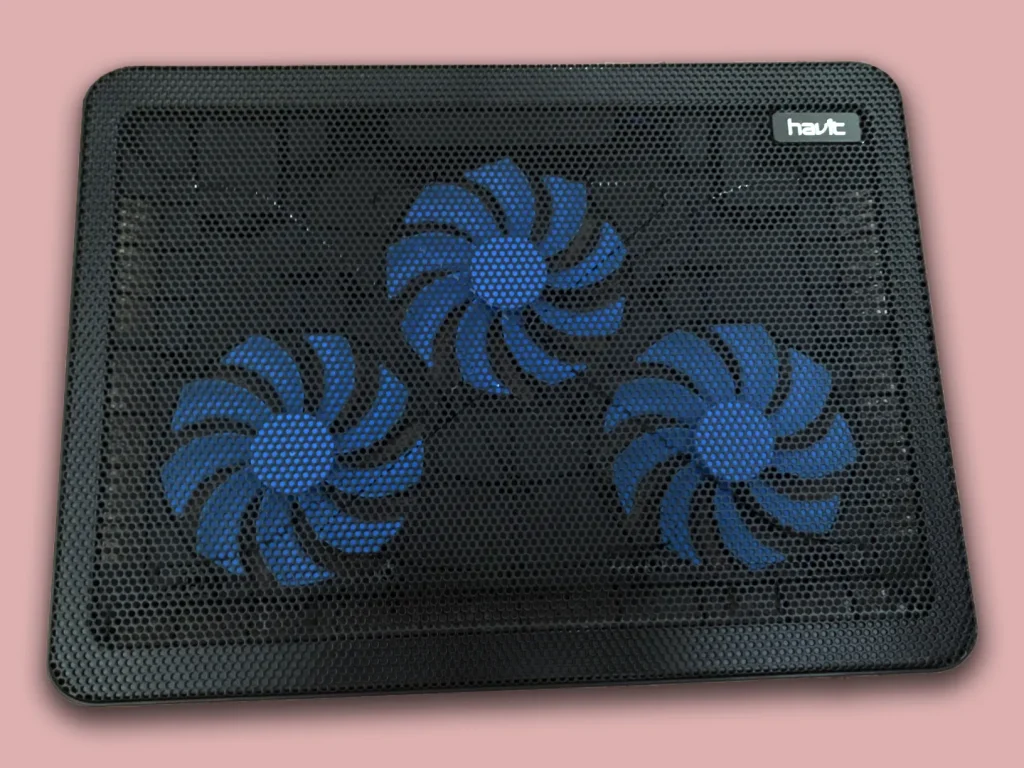
A 15.6-inch laptop sits comfortably with room to spare. A 17-inch laptop fits without hanging over the edges. That alone solves a problem many cheaper pads struggle with.
Rubber grips at the bottom stop it from sliding around on a desk. Small details, but they matter when you’re typing fast or gaming.
There are two height positions. Flat, and slightly raised.
The raised position improves typing posture. Your wrists relax a bit. Your neck doesn’t tilt forward as much. After a few hours, you notice the difference.
Is it a full ergonomic stand? No.
Is it better than a flat desk? Absolutely.
Technical Specifications (Quick Look)
Here’s what you’re working with:
- Three large cooling fans
- Metal mesh surface
- USB-powered (USB-A)
- Two USB ports (one input, one pass-through)
- Compatible with 15.6″ to 17″ laptops
- Lightweight and slim profile
No software. No controls. That’s intentional simplicity.
Cooling Performance: Does It Actually Help?
Short answer: yes.
Long answer: it depends on what you expect.
This cooling pad doesn’t replace internal laptop fans. It supports them. It feeds them cooler air. That’s the whole idea.
In real use, most people report temperature drops between 5 to 10 degrees Celsius under sustained load. That’s enough to reduce thermal throttling in many laptops.
What does that feel like?
- Fans spin less aggressively
- Keyboard stays cooler
- Performance drops happen less often
- Long sessions feel more stable
If your laptop already runs cool, you’ll notice mild improvements.
If it runs hot, you’ll notice relief.
It shines during long tasks. Video calls. Editing sessions. Extended gaming. The moments when heat slowly builds up and ruins the experience.
Noise Levels: Quiet Enough to Forget
Nobody wants another loud fan on their desk.
The HV-F2056 keeps things restrained. Even with all three fans running, the sound stays low. It blends into the background.
During typing, you’ll barely notice it.
During gaming, it gets drowned out by your laptop’s own fans anyway.
There’s no pitchy whine. No rattling. Just steady airflow.
For shared spaces or late-night work, that matters.
USB Ports and Power Use
This cooling pad uses one USB-A port for power. In return, it gives you a USB pass-through port on the side.
That means you don’t lose a port entirely. You just relocate it.
If your laptop only has USB-C ports, you’ll need a simple adapter. Not a dealbreaker, but something to plan for.
Power draw is minimal. You can even run it from a power bank in a pinch.
Daily Use: Living With It Long Term
This is where the HV-F2056 earns its keep.
You don’t think about it. You don’t adjust it. You don’t manage settings.
You put your laptop on it. You plug it in. You move on with your day.
Dust builds up over time, like with any fan. A quick wipe every few weeks keeps it clean.
The fans hold up well. No sudden noise changes. No wobble after months of use.
That kind of reliability matters more than flashy features.
Pros and Cons
Pros
- Provides top-notch protection against a variety of garage threats.
- Simple to maintain, making life a bit easier.
- The installation process is a breeze – just unroll and cut to fit.
- Durable enough to withstand the hustle and bustle of a busy garage.
Cons
- Limited to one size, which might not fit all garage dimensions perfectly.
- The color options are few, which may not suit everyone’s taste.
What Works Well
- Noticeable cooling improvement
- Quiet operation
- Supports large laptops properly
- Lightweight and portable
- Simple plug-and-play use
- Extra USB port helps offset power use
Where It Falls Short
- LED lights can’t be turned off
- No fan speed control
- Limited height adjustment
- USB-A power only
None of these are deal-breakers. They’re trade-offs.
Who Should Buy This Cooling Pad?
This is a good fit if you:
- Use a laptop for hours at a time
- Work or study from home
- Game casually
- Travel with your setup
- Want less heat without hassle
It’s less ideal if you:
- Need extreme cooling
- Want adjustable fan control
- Prefer silent, LED-free gear
Know your use case. That makes the decision easier.
Final Verdict
The Havit HV-F2056 doesn’t try to impress with bold claims. It focuses on comfort, airflow, and consistency.
It cools without noise.
It supports without bulk.
It works without effort.
If your laptop runs warm and you want a simple, reliable fix, this cooling pad earns its spot on your desk.

 By
By