For many home offices and small businesses, a reliable laser printer is still one of the most important tools in the workspace. Speed, clear print quality, and dependable performance matter much more than extra features that rarely get used.
This Brother wireless laser printer and scanner focuses on the essentials. Instead of loading the machine with unnecessary extras like fax capabilities, it delivers what many people actually need: solid printing, dependable scanning, and simple wireless connectivity. For users who want a practical office printer that handles everyday tasks without fuss, this model fits the role very well.
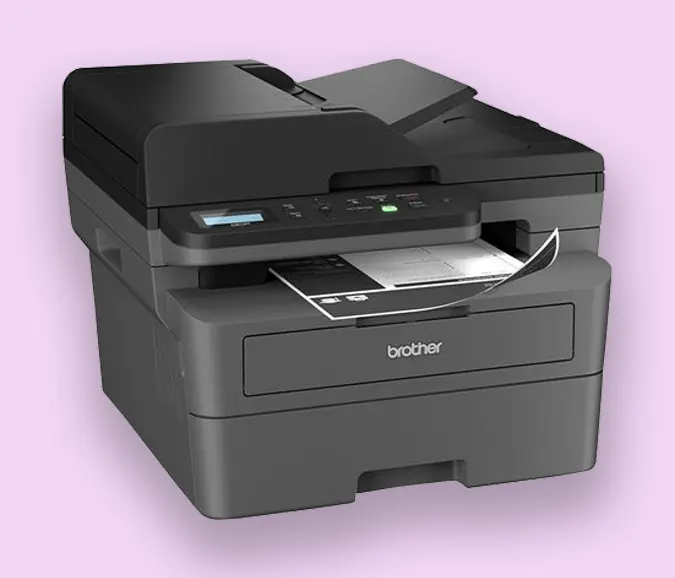
After extended use with different types of media and typical office jobs, the printer proves itself to be both capable and dependable.
Reliable Performance Across Different Paper Types
One of the first things noticeable about this printer is how well it handles different kinds of paper. Regular text documents print quickly and clearly, but the printer also performs well with more specific tasks.
Envelopes, voucher checks, and documents containing graphics all run smoothly through the machine. For a small business environment where document types vary frequently, this kind of versatility is important. Instead of needing multiple devices or complicated settings, the printer adapts easily to the job.
There can be a small learning curve when working with unusual envelope sizes, but that tends to depend more on the software used for formatting rather than the printer itself.
Strong Print Quality and Easy Adjustments
Print quality is another area where this machine performs well. Text comes out crisp and sharp, which is exactly what you want from a laser printer used for professional documents.
The printer also provides several useful adjustments that allow you to fine-tune output based on your needs. Print density settings make it easy to control how dark the text appears, and toner economy options help extend cartridge life when printing large batches of documents.
These small controls make a noticeable difference over time, especially in offices where printing costs and toner usage matter.
Built With a Solid, Durable Feel
From a build perspective, the printer feels sturdy and well made. The machine has a slightly heavier, more durable design that gives the impression it’s built for long-term use rather than occasional printing.
The paper trays operate smoothly, and the overall structure feels stable when in operation. For a workhorse office printer, that solid construction adds confidence that it can handle regular daily use without feeling fragile.
Even after frequent printing sessions, the machine continues to run consistently.
Minor Paper Handling Quirks
Like most printers, there can occasionally be small hiccups during operation. When using the front tray for envelopes, the printer may sometimes indicate a paper jam even when nothing is actually stuck.
Fortunately, this is usually a simple issue to resolve and doesn’t require any complicated troubleshooting. Once cleared, the printer continues working normally.
Situations like this are fairly minor and don’t interfere with everyday use.
Simple Wireless Connectivity
Wireless setup is often where many printers become frustrating, but this model can be connected smoothly when approached the right way.
Instead of relying solely on automatic discovery through software, the most reliable method is using the printer’s console controls. By selecting the wireless network directly from the printer and manually entering the router password, the machine connects quickly and consistently.
Typing the password with the console buttons can take a moment, but the process tends to work reliably. Once connected, the printer becomes instantly available across multiple devices.
After setup, printing from desktops, laptops, phones, and tablets works without any issues.
Great Fit for Small Offices
This printer is particularly well suited for small business environments or home offices. It handles common tasks such as document printing, envelope processing, and scanning without unnecessary complexity.
By focusing on the features people actually use, the machine stays practical and easy to manage. For users who no longer need outdated features like faxing, the streamlined design makes perfect sense.
Final Thoughts
This Brother wireless laser printer and scanner proves to be a dependable choice for anyone who needs a straightforward office printing solution. It delivers strong print quality, handles different paper types well, and feels solidly built for regular use.
While the wireless setup process works best through the printer’s console and there may be occasional minor paper alerts, these are small trade-offs for an otherwise reliable machine.
For small businesses or home offices that want a durable printer focused on the essentials, this Brother model performs exactly as expected and continues to handle everyday printing tasks with ease.

 By
By